
关联主题::Obsidian知识主题
同级:: 2025-12-06_星期六
下一级::
重点想说一下,如何使用[硅基流动]配置。
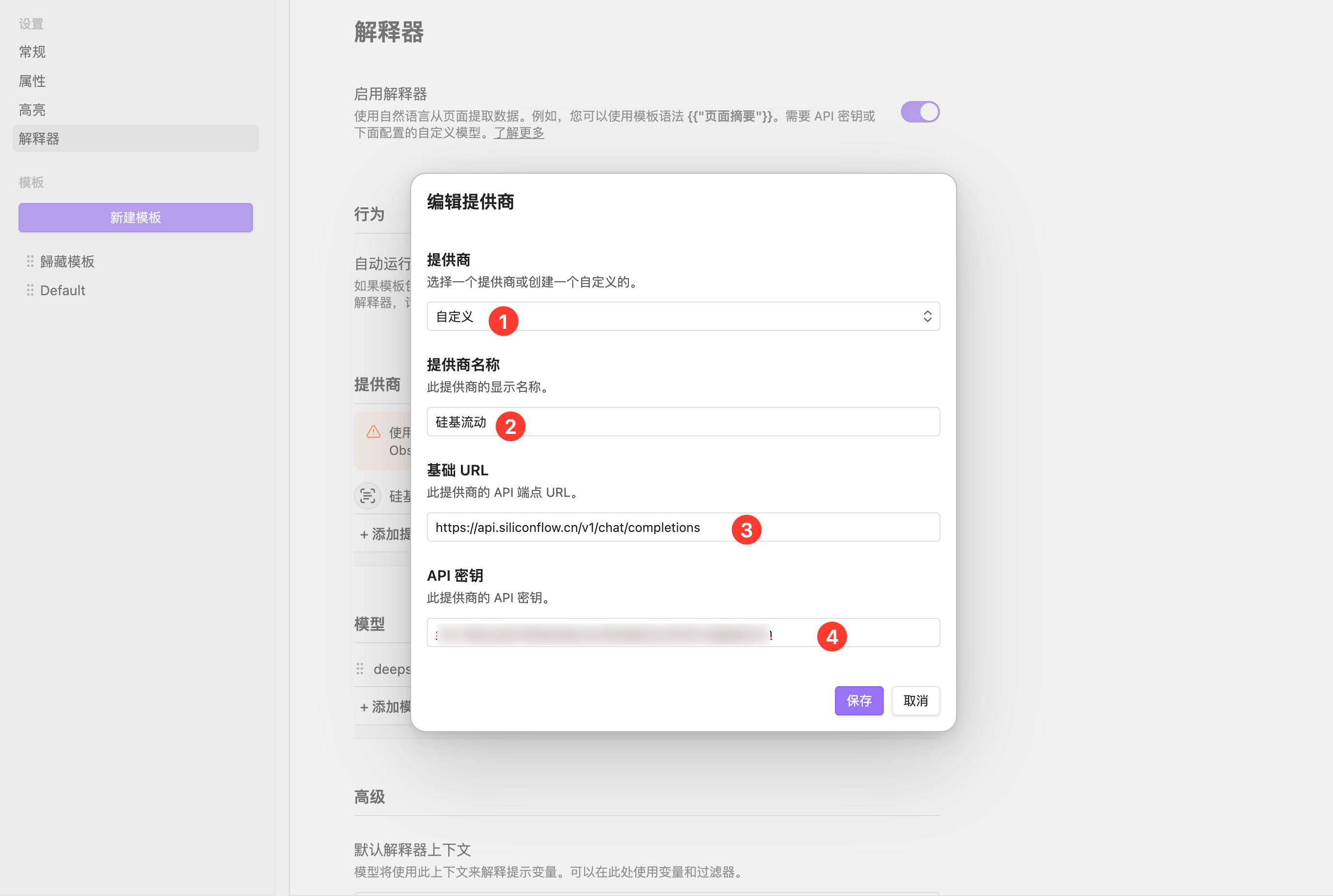
解释器供应商设置
1、提供商选择「自定义」;
2、提供商名称为「硅基流动」;
3、基础URL为:https://api.siliconflow.cn/v1/chat/completions
4、API密钥(在硅基流动获取)
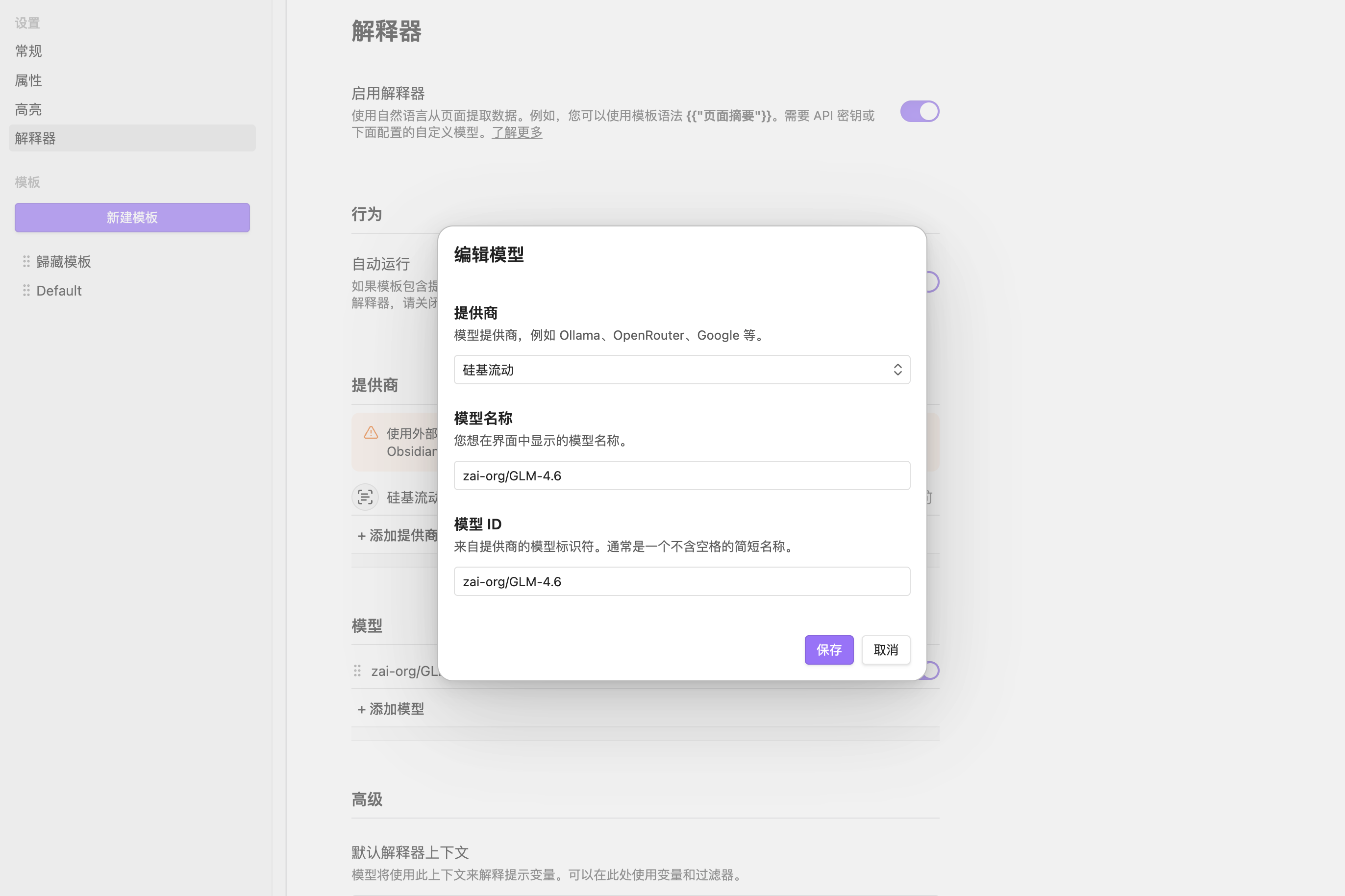
模型名称直接在[硅基流动]那边复制即可
一、插件安装地址
地址: https://obsidian.md/clipper
也可以去浏览器应用商店下载。
各种变量
| Variable | Description |
|---|---|
{{author}} | Author of the page |
{{content}} | Article content, highlights, or selection, in Markdown format |
{{contentHtml}} | Article content, highlights, or selection, in HTML format |
{{date}} | Current date, can be formatted using the date filter |
{{description}} | Description or excerpt |
{{domain}} | Domain |
{{favicon}} | Favicon URL |
{{fullHtml}} | Unprocessed HTML for the full page content |
{{highlights}} | Highlights with text and timestamps |
{{image}} | Social share image URL |
{{published}} | Published date, can be formatted using the date filter |
{{selection}} | Selection in Markdown format |
{{selectionHtml}} | Selection in HTML format |
{{site}} | Site name or publisher |
{{title}} | Title of the page |
{{time}} | Current date and time |
{{url}} | Current URL |
{{words}} | Word count |
参考资料:
1、Obsidian Web Clipper 深度使用笔记:Deepseek 智能加持,微信公众号等素材高效管理 :帮我搞懂了硅基流动的API设置;
2、[现在最强的AI网页剪藏工具,而且还免费!Obsidian AI教程02](https://mp.weixin.qq.com/s/VRQ_QWjuUqvJC8FeAZgvzw
3、官方说明文档: https://help.obsidian.md/web-clipper/capture
4、利用 Deepseek 结合 Obsidian Web Clipper 实现快速剪藏及内容总结 - 知识管理工具 - PKMer
5、(18) AI剪藏公众号文章,全自动总结、提炼、存进Obsidian - YouTube
6、Obsidian Web Clipper 还在吃灰?这才是它的正确用法 | 回到Axton_哔哩哔哩_bilibili
7、Obsidian Web Clipper 与 AI 自动化:构建内容聚合与发布流水线🔥
8、构建智能知识库 - 知识获取:Obsidian Web Clipper 的 AI 自动化流程-CSDN博客
9、(18) Obsidian Web Clipper AI接入教程 支持DeepSeek 知识管理效率加倍 - YouTube
🔐 GitHub 评论(Giscus)
正在连接 GitHub 评论…